
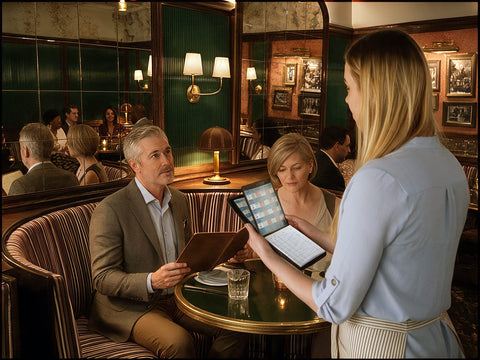
A restaurant's first job is the guest experience. Everything else follows from it.
Yet in recent years, too many restaurants have traded hospitality for efficiency. Or what looks like efficiency on a spreadsheet. Nowhere is that trade more visible than when a server takes an order.
That moment sets the experience for the whole meal. It's the first real conversation between server and guest. So how should it happen?
There are three ways servers take orders today:
- Typing it into a handheld POS device
- Memorizing it
- Writing it down
Let's look at each one from where it matters most: the guest's side of the table.
Method 1: The handheld POS

Handheld POS devices promise speed. Orders go straight to the kitchen—no trip to the server station.
But look at what the guest actually gets.
The guest becomes part of a data-entry session. The server is no longer having a conversation. They're working a menu tree on a small screen. Tapping modifiers. Scrolling for the side substitution, checking that the right seat number is selected.
The server's attention goes to the device, not the guest. A mistake on a handheld is costly. Wrong item, wrong modifier, wrong seat — it's a comp, a remake, or a voided ticket. So the server does the sensible thing: they focus on not making that mistake. Eyes down. Head tilted. Half-listening.
The screen is smaller than the one it replaced. The fixed POS terminals in the server station are large and built for fast entry. Handhelds shrink that job onto a phone-sized screen — and move it to the table, in front of the guest.
The server carries an expensive, breakable tool all shift. Handhelds get dropped, splashed, and stuffed into aprons. And they depend on Wi-Fi. When the connection drops on a busy night, the server is left standing at the table with a frozen screen. A cracked screen, a dead battery, or a lost signal leaves them with no way to take the order at all.
And the payoff for all of this? Skipping a walk to the server station. A walk that typically takes less than a minute.
That's the trade: the guest's first real interaction with their server, swapped for a few saved steps.
Method 2: Memory
Servers who memorize orders are proud of it. And it is impressive. Six guests, three modifications, two allergies — all held in their head.
Most of these servers believe it makes them look sharp. That guests see it as a sign of skill.
Here's what many guests are actually thinking: Is he going to get that right?
From the moment the server walks away without writing anything down, guests worry about their order. Did he catch "dressing on the side"? Did she hear "no onions"? That's a question diners should never have to think about. They came to relax, not to audit their server.
And when a memorized order goes wrong, guests are less forgiving. A mistake on a written order feels like an honest slip. A mistake on a memorized order feels like showing off that didn't pay off. The party trick turns into the reason the table remembers the night for the wrong reasons.
Method 3: Writing it down
Writing is the most engaging, accurate, guest-first way to take an order. Here's why.
You can write and talk at the same time. Pen on paper doesn't demand your eyes the way a touchscreen does. You keep eye contact. You answer questions about the special. You suggest a wine. The guest feels listened to, because they are.
The guest sees their order captured. No one wonders if "no onions" made it. The pen moving on the pad tells them it did. That small moment of reassurance lets them settle in and enjoy the meal.
You have a record you can trust. Restaurants move fast. Anything that can happen usually does. A table changes seats. A guest amends an order. The kitchen asks what seat 4 had. A written order, taken in the moment, answers it all — and it's right there when you enter it at the POS station.
Mistakes are rare, and easier to forgive. Writing catches details that memory drops. And when something does slip, the guest saw you take care with their order. That goodwill counts.
The best way to write an order: the Waiter Wallet System
If writing is the best way to take an order, the next question is what you write with. A loose pad pulled from an apron pocket works. Barely.
Waiter Wallet invented the server book in 2009. Then we perfected it. It's patented and designed from real restaurant experience — for the exact moment a server stands at the table, pen in hand. The system has three parts.
The Waiter Wallet

Your notes, in view. Hidden from guests. A large built-in display window sits right above your pad. The included Clear Pocket Insert adds two more, front and back. That's three cheat sheet displays in all. The top-fold design keeps it all out of the guest's sight. They see a server who knows the menu. Not a crib sheet.
Cash and receipts stay sorted. Separate compartments keep money, receipts, and order pads apart, so you're never fumbling at the table.
Built to last a double. Premium stitched Durahyde holds up through high-volume nights. No battery to die. No screen to crack.
A size for every restaurant. Fine dining, casual, bar service — there's a Waiter Wallet that fits the way your team works.
The Waiter Wallet Pad
Formatted for accurate orders. Table, seat, and course columns give every order a place. Your notes stay legible — to you, and to anyone who needs to read them in a rush.
A firm surface to the last page. A dual backboard keeps the pad stable down to the final sheet. That's what makes it easy to write and keep eye contact at the same time.
Pages that stay put. Cheap glue-bound pads come apart when the floor gets slammed. Waiter Wallet Pads are staple-bound and reinforced with protective tape. Perforated sheets tear out cleanly when you want them to — and not before.
Twice the orders, same pad. Double-sided printing gives you 100 order surfaces in every 50-page pad: fewer swaps, less bulk, a cleaner server book.
Free cheat sheet software
Every Waiter Wallet comes with access to ten free, customizable, print-ready cheat sheet templates. Wine pairings. Allergen grids. Daily specials. Bar notes. POS shortcuts. It also includes our AI Wine Pairing tool.
Print them, slide them into the clear pockets, and the answers are right there when a guest asks. This is the honest version of memorizing: you don't have to hold the allergen list in your head. You have to glance down.
Servers who know more, sell more. And earn more.
A desk at the table
Put it together, and a server walks up to the table ready. Specials in view. Pad in place. Pen in hand. Nothing to fumble, nothing to look for.
It's like having a desk with all your notes, right at the table.
That's what lets a server stay focused on the guest. Confident, organized, and present for the conversation that starts the meal.
The bottom line
|
|
Handheld POS
|
Memory
|
Writing (Waiter Wallet)
|
| Server's attention | On the screen | On remembering | On the guest |
| Guest's confidence | Watching data entry | Wondering if it's right | Sees it captured |
| Accuracy | High stakes for small taps | Depends on the night | Written record in hand |
| When mistakes happen | Costly to fix | Hard to forgive | Easier to forgive |
| What the server carries | Expensive, breakable device | Nothing | Light, durable organizer |
Restaurants don't win loyalty by saving a walk to the server station. They win it at the table, one conversation at a time.
If hospitality comes first, the choice is simple. Put down the device. Skip the party trick. Write the order — and give your servers the tool built for it.
